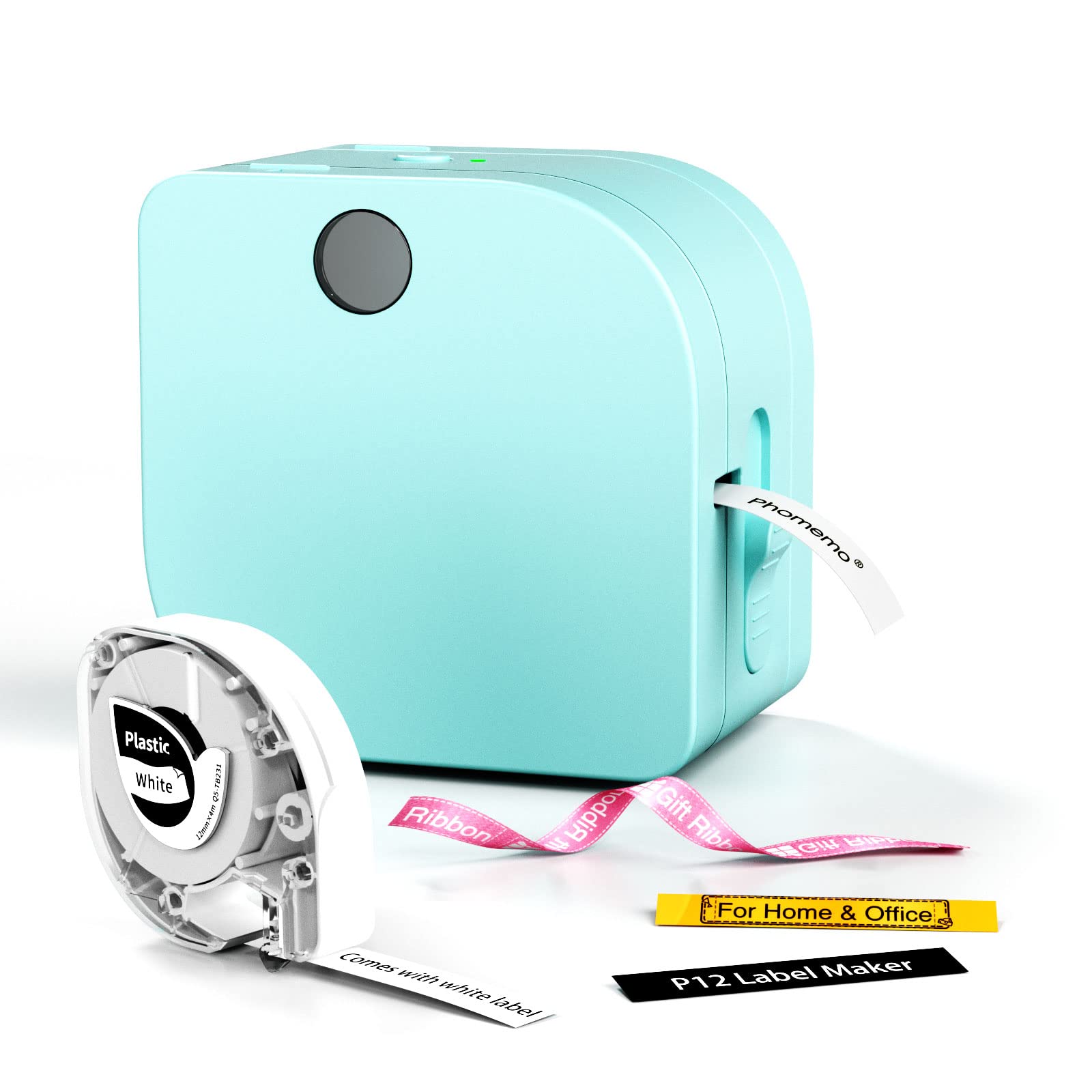
The Phomemo P12 Label Maker Machine review centers on a compact phone-connected printer designed for home organization, classroom labels, and small creative projects.
Its notable distinction is support for both thermal and thermal transfer labels, paired with two power options and a feature-rich mobile app.
Phomemo P12 Review Summary
The quick verdict
2,000+ ratings
Read Amazon ReviewsPhomemo P12 Label Maker
A fit for home, classroom, and craft users who want phone-designed labels and a choice of everyday thermal or transfer media.
- Bluetooth printing from compatible iOS and Android phones through an app.
- Supports thermal labels as well as thermal transfer labels, including options such as thermal paper labels, iron-on labels, and ribbons.
- The app lists more than 15 languages, 90 fonts, and 1,000 borders and symbols.
- Label creation options include text, barcode, Excel import, scanning, OCR, and voice recognition.

Pros
- Two label technologies make it suitable for a wider range of tasks than ordinary pantry and folder labeling alone.
- The app combines ready-made design elements with tools for entering or importing label content.
Consider before buying
- Battery-powered use requires six AAA batteries, which are not included.
- The app-based Bluetooth workflow means buyers should be comfortable designing labels on an iOS or Android phone.
Read the full review summary
The P12 is aimed at people who make lots of small labels for containers, folders, supplies, or crafts.
Bluetooth pairing with iOS and Android phones gives access to templates, fonts, borders, and symbols, while text, barcode, spreadsheet import, scanning, OCR, and voice recognition functions offer several ways to prepare a label.
A built-in cutter is intended to simplify finishing a print.
Its dual-media approach makes it more flexible than a printer limited to one label type: standard thermal labels suit routine household tasks, while transfer labels are presented for uses such as clothing and outdoor or bathroom labeling.
The tradeoff is that buyers need to choose compatible supplies and a power setup for their needs. USB-C operation supports longer sessions near an outlet; six AAA batteries, which are not included, offer a portable alternative.
The buying factors
Phomemo P12 Scorecard
Editorial scores reflect listed features and buyer fit; they are not laboratory measurements or customer ratings.
Media flexibility
Supports both thermal labels and thermal transfer labels, opening up different labeling uses.
App design tools
The app offers a broad set of languages, fonts, borders, symbols, and label creation functions.
Power options
USB-C or six AAA batteries provide a choice between plugged-in use and portability.
Everyday versatility
The described uses span kitchen, storage, school, office, garden, and craft labeling.
Setup convenience
Bluetooth app printing and a built-in cutter streamline the workflow, though creating labels depends on a compatible phone and app.
Supply planning
The two media types add flexibility, but buyers should match label supplies to their intended surfaces and use.
Key Features and Specifications of Phomemo P12
- Bluetooth printing from compatible iOS and Android phones through an app.
- Supports thermal labels as well as thermal transfer labels, including options such as thermal paper labels, iron-on labels, and ribbons.
- The app lists more than 15 languages, 90 fonts, and 1,000 borders and symbols.
- Label creation options include text, barcode, Excel import, scanning, OCR, and voice recognition.
- A built-in cutter is included for separating completed labels.
- Power it through the included USB-C cable connected to an outlet, or use six AAA batteries, sold separately.
- The product description specifies 203 DPI printing and BPA-free labels.
Pros and Cons of Phomemo P12
Pros
- Two label technologies make it suitable for a wider range of tasks than ordinary pantry and folder labeling alone.
- The app combines ready-made design elements with tools for entering or importing label content.
- USB-C power is useful for extended work near an outlet, while AAA batteries give another option when carrying the printer.
- The described use cases cover personal organization, classrooms, offices, and craft decoration.
Consider before buying
- Battery-powered use requires six AAA batteries, which are not included.
- The app-based Bluetooth workflow means buyers should be comfortable designing labels on an iOS or Android phone.
- Because the printer supports different label media, buyers should confirm the type they need is available and suitable for their intended surface before stocking up.
Who Should Buy Phomemo P12?
Good fit
Consider the Phomemo P12 if your labeling ranges from ordinary household organization to projects that call for transfer media.
The ability to use thermal and transfer labels could be useful for someone labeling containers one day and preparing clothing or craft labels another, provided they choose the appropriate supplies for each job.
It also looks well matched to teachers, parents, and home organizers who want to make labels from a phone rather than compose them on a computer.
The large stated selection of design elements and text-entry methods can help when labels vary in style or content, while the cutter reduces a small finishing step.
For frequent sessions at a desk, the USB-C cable gives you an outlet-powered option.
If you expect to carry it around, check that six AAA batteries suit your routine and budget, and select the label material before taking the printer away from a power source.
Who should skip it
Skip this model if you need a printer that works without a phone app: its described setup and customization rely on Bluetooth and an iOS or Android app.
Before buying, confirm that this workflow fits how you prefer to create labels.
It may also be a poor match if you want to avoid managing different label media or expect one type to suit every surface.
Review the intended applications and make sure the compatible thermal or transfer labels you need are easy for you to source.
Phomemo P12 Label Maker Machine review: what its design means for buyers
Two label types broaden the use case
The P12’s support for thermal and thermal transfer labels is its main point of differentiation in the supplied feature set.
The description associates everyday thermal labels with kitchen and tidying tasks, and transfer labels with clothing, bathroom, dishwasher, outdoor, and industrial labeling.
Buyers should treat those as use-case guidance and check the specific media instructions for their intended surface and conditions.
A capable app, with a phone-first workflow
Bluetooth pairing with iOS and Android phones opens access to a substantial library of fonts, borders, symbols, and languages.
Barcode creation, Excel import, scanning, OCR, and voice recognition can help when label content varies, but these functions also make the app central to the experience.
If you prefer to create labels on a computer or directly on the printer, confirm the workflow before choosing it.
Choose power based on where you print
USB-C operation connected to an outlet is the practical choice for a longer labeling session at a desk.
Six AAA batteries provide a way to carry the printer beyond an outlet, but they are sold separately, so mobile use involves planning for batteries.
The right option depends on whether the printer will mostly stay in one place or travel with you.
Check media and workflow before buying
The P12’s range of possible uses depends on matching the label stock to the task. Decide whether you need everyday thermal labels, transfer labels, or both, then confirm the particular supplies suit your planned surfaces.
That simple check helps prevent the broad media choice from becoming an inconvenient supply mismatch.
Alternatives to Phomemo P12
Battery-focused alternative

28,000+ ratings
Read Amazon ReviewsPhomemo D30 Label Maker
Choose the D30 if rechargeable operation and direct thermal labels cover your needs and you prefer a model described around continuous or fixed-length tape.
The P12 is the more relevant fit if you specifically want its two media approaches and USB-C or AAA power choices.
- The D30 uses direct thermal printing and supports continuous or fixed-length label tape.
- Its supplied feature description highlights predesigned templates, barcode and QR-code creation, Excel import, OCR, and a rechargeable battery.
- The P12 supports both thermal and thermal transfer labels and can run on USB-C power or six AAA batteries.
Desktop Label Printers alternative

14,000+ ratings
Read Amazon ReviewsNIIMBOT D110 Label Maker
The D110 may suit buyers who want rechargeable operation and automatic recognition of supported label stock for routine organization. Consider the P12 if thermal transfer labels and the choice of outlet or AAA power better match your projects.
- The D110 is a rechargeable Bluetooth thermal label maker with an app for iOS and Android.
- Its described label options include clear, colorful, and round labels, with batch printing and automatic label recognition.
- The P12’s described media options include thermal transfer labels as well as standard thermal labels, and it offers USB-C or AAA power.
Is Phomemo P12 Worth It?
The Phomemo P12 Label Maker is worth considering if you want app-designed labels for home, school, office, or craft use and value the choice between thermal and transfer media.
Its variety of design tools and two power options give it a flexible role across small labeling jobs.
Before buying, make sure the phone-based workflow suits you and identify the label media your projects require. The AAA option adds portability, but the batteries are separate; USB-C is the simpler choice for longer use near an outlet.
Your review at a glance
2,000+ ratings
Read Amazon ReviewsPhomemo P12 Label Maker
A fit for home, classroom, and craft users who want phone-designed labels and a choice of everyday thermal or transfer media.
- Bluetooth printing from compatible iOS and Android phones through an app.
- Supports thermal labels as well as thermal transfer labels, including options such as thermal paper labels, iron-on labels, and ribbons.
- The app lists more than 15 languages, 90 fonts, and 1,000 borders and symbols.
- Label creation options include text, barcode, Excel import, scanning, OCR, and voice recognition.